Introducing Design Panel & other features
A few things just landed at formMill. Some you asked for, some we quietly wanted ourselves. And here's the part we're happiest about — basically all of it is free. Here's the full rundown. 👇
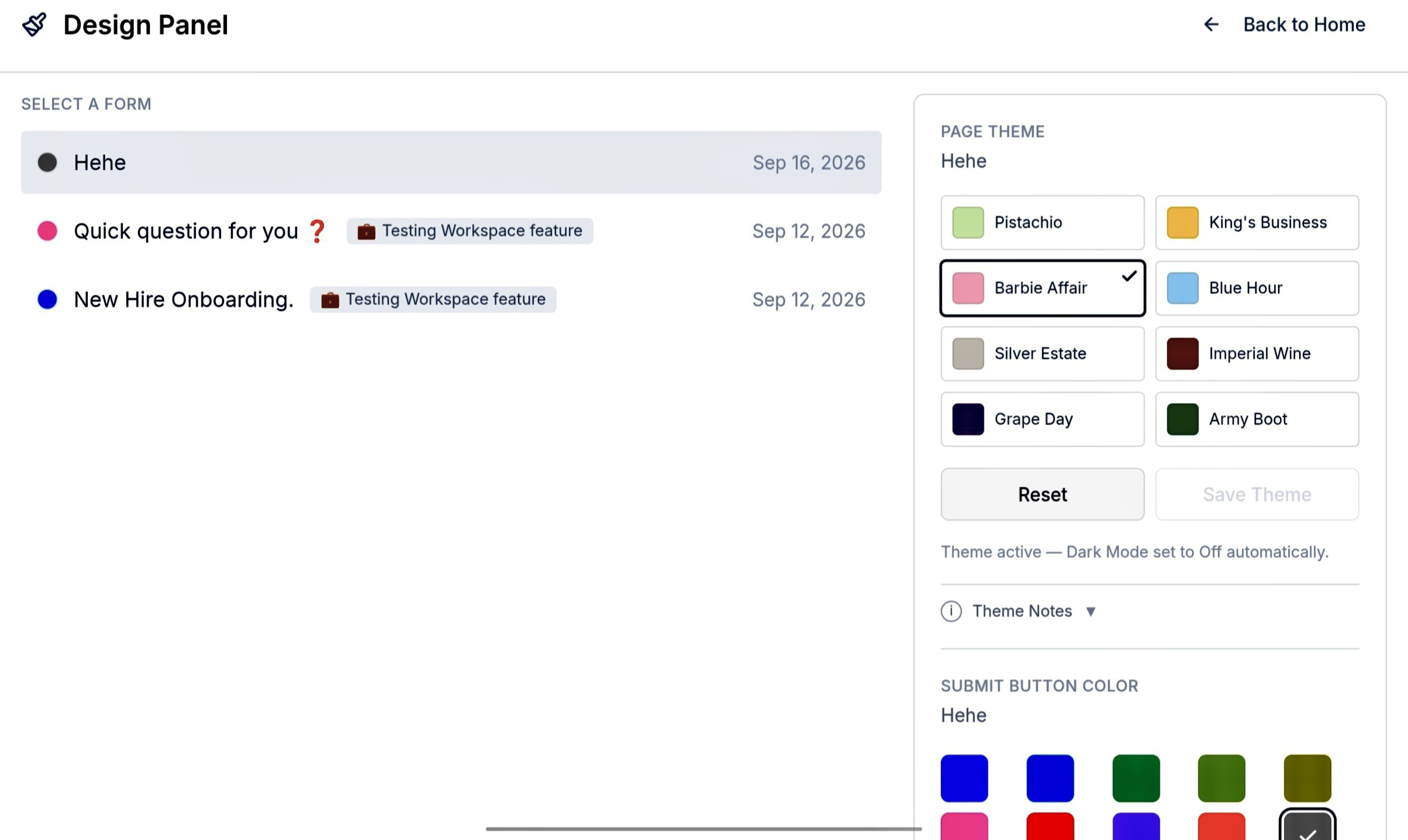
The new Design Panel — themes on the left, button colors on the right.
What shipped ✨
Four updates are going live in this release, and there's a pretty good mix here. We've added more control over how your forms look, a simple way to keep bots away from your submissions, rebuilt CSV exports so they play nicely with Notion and Airtable, and simplified our paid plans at the same time.
There's a lot here, but almost none of it costs anything extra.
Design Panel
This is the big one.
We've added a dedicated Design Panel to FormBuilder, giving you a proper place to control how your form looks instead of having to settle for the same basic appearance every time.
Until now, "make it yours" mostly meant picking a color and hoping it looked good. That worked, but there wasn't much room to actually give a form its own personality. The new Design Panel changes that.
There are 8 curated Page Themes to choose from: Pistachio, King's Business, Barbie Affair, Blue Hour, Silver Estate, Imperial Wine, Grape Day, and Army Boot. On top of that, you can choose from 10 different Submit Button colors.
Pick a theme, watch it update in the preview, make any changes you want, and save it. That's basically the whole process. You don't need to know CSS, you don't need a design degree, and you definitely don't need to watch a 40-minute YouTube tutorial just to make a form look decent.
We've also tried to take some of the annoying decisions out of your hands. Every theme has its own dark-mode behavior, which means the text, buttons, and other elements are automatically adjusted to stay readable. You don't have to sit there wondering whether a particular background is going to make your text impossible to see.
And the whole thing is free.
All 8 themes, all 10 button colors, and the Design Panel itself are available on the Free plan. No watermark, no "upgrade to unlock this color" nonsense.
✅ Free FeatureCaptcha — bot protection
Another addition we've wanted to have for a while is Captcha bot protection.
Most of the time, you probably won't think about bot protection at all. That's kind of the point. But the moment a form starts getting hammered with hundreds of useless submissions from automated bots, it becomes a very real problem. Your submission list gets filled with junk, useful responses become harder to find, and you end up spending time cleaning up something you never asked for in the first place.
Captcha is there to help prevent that.
You can set it up directly from your formMill dashboard. Open the dashboard, go to the form you want to protect, enable Captcha, and from there it's handled as part of the form rather than requiring you to go off and configure some completely separate service.
We wanted this to stay simple. There's no third-party account you need to create just to protect a form, no complicated setup process, and no extra subscription sitting around waiting to surprise you later.
Once you've enabled it from the dashboard, the protection does its job in the background while your legitimate users can continue submitting the form normally.
And, like the Design Panel, Captcha is available for free. Basic protection against spam bots shouldn't be something you have to pay extra for just because your form happens to become popular.
✅ Free FeatureCSV exports, rebuilt
This one isn't quite as flashy, but it's probably going to make a much bigger difference if you regularly work with your submissions.
We went back through the CSV export system and rebuilt and optimized the pipeline so the files coming out of formMill are much easier to use elsewhere, particularly with Notion and Airtable and their built-in CSV import tools.
If you've ever moved form responses between different tools, you know that exporting a CSV doesn't always mean the job is actually finished. You open it somewhere else and suddenly there are mismatched columns, strange line breaks, or dates that look like they were formatted by an entirely different civilization.
That's the sort of stuff we wanted to get rid of.
The new export format is designed so you can take your form responses, export them from formMill, import the CSV into Notion or Airtable, and actually get on with whatever you were trying to do in the first place.
No cleanup session afterwards. No manually fixing every column. No opening Excel just because the CSV decided to be difficult.
Export → import → done. 🚀
And yes, this is free as well.
✅ Free FeaturePlus plan rolled into Pro
We've also made a change to our pricing structure: the Plus plan is gone, and all of its features have been moved into Pro at $25/month.
This isn't really a new feature, but it felt important to mention because it changes the way you'll see formMill's plans going forward.
The reason was pretty simple. Plus and Pro were close enough in both pricing and features that choosing between them sometimes felt like you needed to study a comparison table before you could make a decision. That's not how we want pricing to work.
So instead of having two paid tiers that overlap, we've combined them into one.
Pro now includes everything that was previously part of Plus, along with the existing Pro features. That gives you one clear paid plan, one upgrade path, and a much simpler idea of what you're getting when you move beyond Free.
Existing Plus users aren't losing anything either. Their features have simply been rolled into Pro, so the combined plan now gives them more for the same $25/month price.
We'd rather have one paid plan that we can explain in a sentence than three plans that require an entire table to understand.
A small note on the Design Panel 📌
There's one little detail about the new Design Panel that we want to make clear.
Custom page backgrounds currently appear on the public-facing form only. They aren't displayed inside FormBuilder or FormPreview yet. So if you choose a theme and don't see the background reflected in those areas, that's expected.
There's also no need to manually switch Dark Mode after selecting a theme. The theme handles its own dark-mode behavior, so changing the Dark Mode setting yourself can work against what the selected theme is designed to do.
We're also not treating these 8 themes as the final list. More themes are already on the way. Hint : Custom Thank You Message feature is being cooked. Hee-Ha 👀